How to Comment Anonymously on Facebook Group in 2026
Want to comment anonymously under a Facebook group without it appearing in the commenter's name? Yes, you can. However, this will depend on the group.



Want to comment anonymously under a Facebook group without it appearing in the commenter's name? Yes, you can. However, this will depend on the group.
Well, here it is. Facebook now provides two options to hide your real name within a group. One of them is anonymous postings. The other is nicknames, which Facebook introduced in late 2025. These both require a group admin to turn on.
This guide explains what each one does. You will find out exactly what you need to do, who is still able to see who you really are, and a handful of tips on privacy before you hit post.
What Anonymous Commenting Actually Means
Anonymous commenting hides your name from regular group members.

So instead of your real name and profile photo, others will see:
- Anonymous Member
- Group Participant
- A nickname, if Facebook allows nicknames in that group
But this privacy has limits.
This is important.
Anonymous commenting is useful for sensitive topics. But it is not the same as being fully invisible.
How to Comment Anonymously on Facebook Group from Desktop
Facebook’s interface changes often. So the exact button name may look a little different for you.
But the general process is simple.
Step 1: Open the Facebook Group
Go to Facebook from your desktop browser.
From the left sidebar, click Groups. The group interface will be open where you want to comment anonymously.

If you do not see the group right away, use the search bar or go to your Groups section.
Step 2: Check Whether Anonymous Participation Is Available
Go to your post where you want to comment.
Click the comment box and check if Facebook shows an option to comment anonymously, use a nickname, or participate anonymously.

If you see that option, choose it before writing your comment.

Then type your comment and submit it.
Step 3: If There Is No Anonymous Comment Option
If there is no anonymous option under your post, you may not be able to comment anonymously there.
In that case, you have two options, ask your group admin to allow anonymous commenting or you need to create your own anonymous post.
If you need help with creating your own anonymous post, read this guide on how to post anonymously on Facebook in 2026.
After your anonymous post is approved, you can usually comment under your own anonymous post while staying anonymous to regular group members.
Step 4: Review Before Posting
Before you submit the comment, check the name or label beside the comment box.
Make sure it does not show your real profile name.
If it shows your name, your comment will not be anonymous.
How to Comment Anonymously on Facebook Group from Mobile
You can also try anonymous commenting from the Facebook mobile app.
The process is almost the same.
Step 1: Open the Facebook App
Open the Facebook app on your phone.
Go to the group where you want to comment.

Step 2: Find the Post
Open the post where you want to leave a comment.
Tap the comment box.

Step 3: Look for the Anonymous Option
Check if Facebook gives you an option to comment anonymously, use a nickname, or participate anonymously.
If the option appears, select it.
Then write your comment and tap the comment button.

Step 4: If the Option Does Not Appear
If the option does not appear, try these first:
- Update your Facebook app
- Close and reopen the app
- Try from desktop
- Check another group to see if the feature appears there
- Make sure you are using your personal profile, not a Page
If it still does not appear, the group may not support anonymous commenting.
Can You Comment Anonymously on Someone Else’s Facebook Group Post?
No. You cannot comment anonymously on anyone else Facebook Group post.
If the group supports anonymous participation or nicknames, you may be able to comment anonymously only on your post.

So the real answer is:
You can not comment anonymously on someone else’s post.
If the option is not there, do not assume your comment will be anonymous.
Why You Cannot Comment Anonymously in Some Facebook Groups
There are a few common reasons.
1. The Admin Has Not Enabled Anonymous Participation
Group admins control many group settings.
If anonymous posting or participation is turned off, members will not see the option.
2. The Feature Is Not Available in That Group
Facebook does not always roll out features to every group at the same time.
Two groups can have different options even if they look similar.
3. You Are Trying to Comment on the Wrong Post
Some groups may allow anonymous comments only in certain places.
For example, you may be able to comment anonymously on your own anonymous post, but not on a regular post from another member.
4. Your App Is Outdated
Older versions of the Facebook app may not show the latest group features.
Update the app and try again.
5. You Are Too New to the Group
Some groups review activity more carefully for new members.
You may need to wait, follow the rules, and build trust before some features become available.
6. The Post Requires Admin Approval
Some anonymous posts and comments may go through moderation.
If your comment does not show right away, it may be waiting for an admin review.
Important Privacy Tips Before You Comment Anonymously
Anonymous comments can help you speak more freely.
But you still need to be careful.
Your name may be hidden, but your words can reveal who you are.
Avoid Personal Details
Do not include details like:
- Your workplace
- Your school
- Your city
- Your exact age
- Your family members’ names
- Your job title
- Your unique life story
Instead of saying:
“I work as a nurse at a private clinic in Dallas and my manager did this yesterday…”
Say:
“I work in healthcare, and I recently faced a difficult situation with a manager…”
That keeps the point clear without exposing too much.
Watch Your Writing Style
People who know you may recognize how you write.
So avoid your usual phrases, emojis, jokes, or spelling habits if the topic is sensitive.
Do Not Mention Old Conversations
Do not say things like:
“As I said in my post last week…”
or
“Some of you already know my story…”
Those small clues can connect your anonymous comment to your real identity.
Be Careful with Screenshots and Photos
Photos can reveal more than you think.
They may show:
- Your room
- Your location
- Your workplace
- Your child’s school
- Your car number plate
- Your device details
Check everything before uploading.
Understand Your Digital Footprint
Even when you use Facebook’s anonymous feature, your online activity still leaves traces.
Your browser, device, account, and behavior can all become part of your digital footprint.
Private browsing or a VPN may reduce some browser-level tracking. But they do not hide your identity from Facebook, group admins, or moderators when you use Facebook’s anonymous group features.
What Group Admins and Moderators Can See
This part is very important.
Admins and moderators can see the real profile behind anonymous activity.
They need this access to keep the group safe.
Without it, people could use anonymous comments to spam, bully, harass, or break rules without accountability.
So if you are posting about something sensitive, choose groups carefully.
Join groups where:
- Admins are active
- Rules are clear
- Members are respectful
- Sensitive posts are handled carefully
- Privacy is taken seriously
Anonymous commenting works best in communities that already have good moderation.
For Facebook Group Admins: Should You Allow Anonymous Comments?
Anonymous comments can be helpful in the right group.
They work well for communities around:
- Mental health
- Parenting
- Career advice
- Personal finance
- Relationships
- Health topics
- Support groups
- Sensitive life situations
People often ask better questions when they feel safe.
But anonymous participation also needs stronger moderation.
Some members may misuse it. They may post spam, attack others, or break group rules.
So if you manage a Facebook group, set clear rules before allowing anonymous participation.
You can tell members:
- Anonymous does not mean rule-free
- Admins and moderators can still see the real profile
- Harassment is not allowed
- Personal attacks will be removed
- Repeated abuse can lead to removal from the group
This keeps the feature helpful instead of messy.
If you use membership questions to approve new members, you can also understand who is joining before they enter the community. Groupboss helps group admins collect those answers and organize new member data without copying everything manually.
FAQs
When someone posts anonymously on a private Facebook group, can he see his own post with his name and profile photo, or does it appear anonymous to him as well?
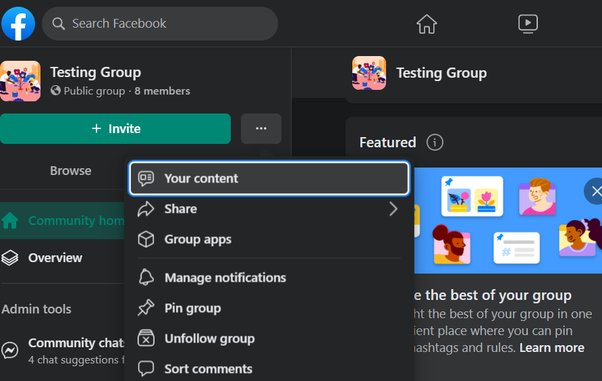
Yes, it will remain anonymous to the person who has posted. But you will get a notification for any engagement in your post. Again if you want to see your post, you can follow these steps.1. Click on the three-dot beside the Facebook group name and go to option “Your Content”
Can I comment anonymously in every Facebook group?
No.
Anonymous commenting depends on the group settings and feature availability. If the group does not support anonymous participation, you will not see the option.
Can I comment anonymously on someone else’s post?
No. You cannot comment on anyone else's posts.
Why don’t I see the anonymous comment option?
The group may not allow it. The feature may not be available to your account. Your app may be outdated. Or Facebook may only allow anonymous comments in certain places inside that group.
Can I delete my anonymous comment?
Yes.
In most cases, you can delete your anonymous comment the same way you delete a regular Facebook comment.
When you remove an anonymous post, all associated comments and reactions disappear as well. The post won't be recoverable once deleted, so consider saving any important information beforehand.
Can group admins reveal my identity to others?
Group administrators have strict guidelines regarding member privacy. While they can see who makes anonymous posts for moderation purposes, they're bound by Facebook's privacy policies and community standards.
Administrators face consequences if they breach this trust by revealing members' identities. Facebook takes these privacy violations seriously and may revoke administrative privileges.
How long does anonymous post approval take?
The approval timeline varies significantly based on multiple factors. Group size, administrator availability, post content, and posting history all influence review speed. Some groups use automated systems to flag certain content for additional review.
First-time anonymous posters might experience longer wait times compared to established members. During busy periods or holidays, approval times might extend further.
What happens if my anonymous post gets denied?
Post denials happen for various reasons. You'll typically receive a notification about the rejection. Many groups provide feedback explaining why they didn't approve the post. This feedback helps you adjust your content for future submissions. You can usually modify and resubmit your post after addressing the concerns.
Can I switch a regular post to anonymous after publishing?
Post privacy settings remain fixed after publication. If you initially post under your name, you cannot convert it to an anonymous post later. The reverse also holds true - anonymous posts stay anonymous. Planning your posting strategy beforehand helps avoid privacy setting changes.
Do anonymous posts show up in Facebook searches?
Facebook's search functionality treats anonymous posts differently from regular content. The visibility settings affect how and where these posts appear in search results. Group privacy settings also influence searchability. Understanding these factors helps manage your content's visibility effectively.
What should I do if I suspect someone knows my identity?
Privacy concerns require careful handling. Multiple options exist for addressing potential identity exposure. Group administrators can help manage these situations. Facebook provides tools and resources for maintaining anonymity. Prevention strategies help avoid future identity concerns.
Final Thoughts
So, how do you comment anonymously on Facebook group posts?
You can do it only when Facebook gives you the option.
And remember: anonymous does not mean invisible.
A good anonymous comment is still respectful, useful, and honest.
Use the feature carefully. Keep your details vague. Follow the group rules. And choose communities where privacy and moderation are taken seriously.